Switch Free Audio Converter14.03
Publisher Description
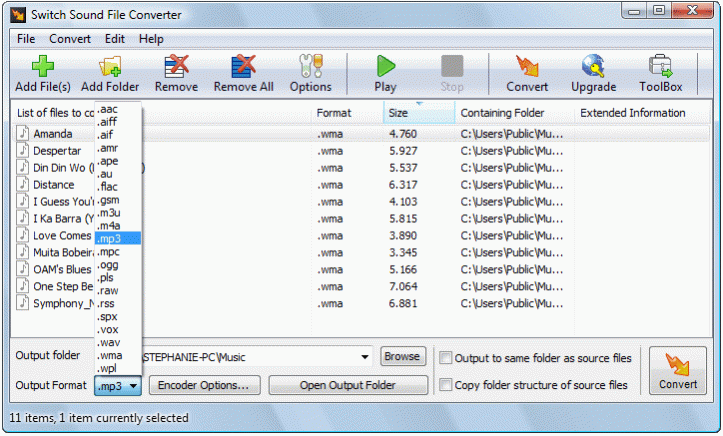
Switch MP3 is an audio file converter for Windows. It can convert mp3, wav, wma and many more audio file formats to the file format of your choice. Switch MP3 converter is easy to use. Just add the audio files to be converted to an audio file format to be converted list, select the output audio file format, and click the convert button.
Free MP3 Converter Features:
* Converts a variety of different audio file formats
* Automatically normalize audio while converting
* Ability to play songs prior to conversion
* Import and convert a playlist (m3u and pls)
* MP3 encoder supports constant or variable bit rates from 8 to 320kbps with optional error correction and stereo modes
* WAV encoder supports sample rates between 6,000 and 196,000Hz in PCM as well as a number of other audio codecs
* Allows up to 32,000 files to be converted in one batch
* Can be run from the command line for automation with other applications
* Optimized CPU usage and efficient code allows for fastest conversion times
* Simple and intuitive interface
A professional version of Switch MP3 Conversion Software is available from NCH Software that can convert to and from additional audio file formats not supported in the free edition.
About Switch Free Audio Converter
This Rippers & Converters program is available in English. It was last updated on 12 October, 2026. Switch Free Audio Converter is compatible with the following operating systems: Windows.
The company that develops Switch Free Audio Converter is NCH Software. The latest version released by its developer is 14.03.
The download we have available for Switch Free Audio Converter has a file size of 2.1 MB. Just click the green Download button above to start the downloading process. The program is listed on our website since 2026-02-21 and was downloaded 254 times. We have already checked if the download link is safe, however for your own protection we recommend that you scan the downloaded software with your antivirus. Your antivirus may detect the Switch Free Audio Converter as malware if the download link is broken.
How to install Switch Free Audio Converter on your Windows device:
- Click on the Download button on our website. This will start the download from the website of the developer.
- Once the Switch Free Audio Converter is downloaded click on it to start the setup process (assuming you are on a desktop computer).
- When the installation is finished you should be able to see and run the program.
Program Details
System requirements
Download information
Pricing
Version History
version 14.03
posted on 2026-02-21
Additional file formats supported, more file formats supported for command line
